
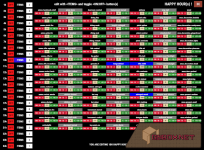
I did a complete rewrite of plugin on v2.0.0 : Set for each hours items and quantities from Happy Hour items list (112 various game items). All with an easy homemade CUI interface (fullscreen).
Permissions
This plugin uses the permission system. To assign a permission, use oxide.grant <user or group> <name or steam id> <permission>. To remove a permission, use oxide.revoke <user or group> <name or steam id> <permission>.- happyhour.admin -- Allows player to use the /happy chat command
Chat Commands
- /happy -- Show admin panel
Usage
It says 'easy' !- clic on word 'ITEMS' right to a happy hour on left column (from 1h to 24h)
- ITEMS button of choosen hour will turn to blue color
- add quantities on item(s) you want to give with /- green and red buttons
- quantities will display under item name
- item(s) type choose will turn to blue color
- right to ITEMS is a count of choosen item types
- turn to ON this happy hour to make it active by a clic on OFF red button
- button turns to ON and green color
- Use -1-10-100 buttons to return quantity value to zero
- Blue color is used to highlight the hour currently on edition, and items types to give
Configuration
The settings and options can be configured in the HappyHour file under the config directory. The use of an editor and validator is recommended to avoid formatting issues and syntax errors.Localization
The default messages are in the HappyHour file under the lang/en directory. To add support for another language, create a new language folder (e.g. de for German) if not already created, copy the default language file to the new folder and then customize the messages.Stored Data
It saves in data file (HappyHour.json) on plugin Unload, and when a give occurs.Future Plans
Private message me your comments about what to include/modify !- change place of saving
- add config file
- add lang
- add randomized skin config bool (bool vanilla / bool workshop)
- add help on main panel at start with decomposed bar
- message player on give at happyhour and if not admin /happy
- config time switch ingame/system
- add button 'for ALL hours reset items quantities to zero'
- add button 'reset items quantities to zero for THIS hour only'

