
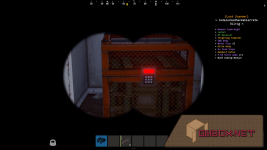
Loot Scanner allows the player to scan container on map. To use Loot Scanner take binoculars, zoom and press use button.
Permissions
This plugin uses the permission system. To assign a permission, use oxide.grant <user or group> <name or steam id> <permission>. To remove a permission, use oxide.revoke <user or group> <name or steam id> <permission>.- lootscanner.world -- Permission to scan world's container
- lootscanner.player -- Permission to scan player's container
- lootscanner.supplydrop -- Permission to scan supply drops
- lootscanner.ch47crate -- Permission to scan crate of CH47
- lootscanner.aliveplayer -- Permission to scan player inventories
- lootscanner.backpack -- Permission to scan backpacks
Configuration
The settings and options can be configured in the LootScanner file under the config directory. The use of an editor and validator is recommended to avoid formatting issues and syntax errors.Localization
The default messages are in the LootScanner file under the lang/en directory. To add support for another language, create a new language folder (e.g. de for German) if not already created, copy the default language file to the new folder and then customize the messages.TODO
- Add Hud scanner on GUI.
- Your suggestions are welcome :).