
Item Puller gives you the possibilty of pulling items from your containers (boxes etc). To use it simply double click the item in the crafting tab (as if you want to craft it) which you want to pull the required ingredients for. It will then (if Item Puller is activated) look through your containers (lootables) in building priviledge radius. If it successfully finds all ingredients needed it will then move the items to your inventory, if enough slots are available. In case you have autocraft enabled it will instantly start crafting the selected item for you. If you are missing items it will show notice via a chat message which ingredient you are missing.
Note: In regards to raiders, if they get tool cupboard access they will be able to pull items from containers in the base if none of the checks are set to true. Which means I highly recommend to set one of the checks to true!
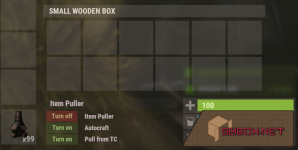
The Check for Team only allows team members of the lootable owners to pull from them, if this option is set to true. Players can not change this option.
The Check for Friend only allows the friends of the lootable owners to pull from them, if this option is set to true. Players can not change this option. Requires the Friends API Plugin!
The Check for Clan only allows the clan members of the lootable owners clan to pull from them, if this option is set to true. Players can not change this option. Requires the Clans Plugin!
The Player Default Settings are the settings each player will get by default. That doesn't mean that he cannot change his setting though if one is disabled in the default player setting.
Force Pull is spawning in items!
Note: In regards to raiders, if they get tool cupboard access they will be able to pull items from containers in the base if none of the checks are set to true. Which means I highly recommend to set one of the checks to true!
UI
Permissions
This plugin uses the permission system. To assign a permission, use oxide.grant <user or group> <name or steam id> <permission>. To remove a permission, use oxide.revoke <user or group> <name or steam id> <permission>.- itempuller.use -- Allows players to use the Item Puller
- itempuller.buildpull -- Allows players to pull on build
- itempuller.forcepull -- Allows players to force pull (spawns items)
Chat Commands
- /ip - toggles item puller on/off
- /ip autocraft - toggles autocraft on/off
- /ip fromtc - toggle tool cupboard pulling on/off
- /ip fp - toggles force pulling on/off (spawning in items)
- /ip settings - shows your current settings
Configuration
The settings and options can be configured in the ItemPuller file under the config directory. The use of an editor and validator is recommended to avoid formatting issues and syntax errors.Default Configuration
Explanation
The Check for Owner is for everyone that wants to go the save route and only allow the owners of the lootables pulling from them then set this option to true. Otherwise the player can pull items from all lootables in his building priveledge zone. Players can not change this option.The Check for Team only allows team members of the lootable owners to pull from them, if this option is set to true. Players can not change this option.
The Check for Friend only allows the friends of the lootable owners to pull from them, if this option is set to true. Players can not change this option. Requires the Friends API Plugin!
The Check for Clan only allows the clan members of the lootable owners clan to pull from them, if this option is set to true. Players can not change this option. Requires the Clans Plugin!
The Player Default Settings are the settings each player will get by default. That doesn't mean that he cannot change his setting though if one is disabled in the default player setting.
Force Pull is spawning in items!

