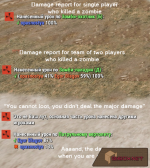
- The plugin is really useful for PVE projects (can be used for PVP I guess, I didn't try, it can be funny), because in PVE you cannot prevent other player from looting your "prey"
- Accounts damage dealt by players to helicopter/bradley/npc. Groups the damage by teams (if enabled)
- Shows damage report for all players involved into fight
- Allows player and allies who dealt minimum threshold damage to loot the crates/corpses
- Other players will not be allowed to loot
- Works for loot and gibs (mining is locked)
- Can disable fire on dropped crates (from heli and bradley)
- After configured timeout crates are unlocked for everyone
Functionality
Functionality has been redesigned to lock based on the first player or team to hit the minimum threshold set in the configuration file. Functionality to share loot based on top damage dealt has been removed.Players cannot leave their team while fighting a bradley. They must destroy the bradley first. This prevents exploiting of the lockout mechanic.
Permissions
This plugin uses the permission system. To assign a permission, use oxide.grant <user or group> <name or steam id> <permission>. To remove a permission, use oxide.revoke <user or group> <name or steam id> <permission>.- lootdefender.bypass.loot -- players with this permission will be allowed to loot anything
- lootdefender.bypass.damage -- players with this permission will be allowed to damage anything
- lootdefender.bypass.lockouts -- players with this permission will not receive a bradley lockout
Configuration
The settings and options can be configured in the LootDefender file under the config directory. The use of an editor and validator is recommended to avoid formatting issues and syntax errors.Bradley Settings
- Messages
- Broadcast Kill Notification To Chat (true)
- Broadcast Kill Notification To Killer (true)
- Broadcast Locked Notification To Chat (true)
- Damage Lock Threshold (0.2)
- Harvest Too Hot Until (0 = Never) (0.0)
- Lock For X Seconds (0 = Forever) (30)
- Remove Fire From Crates (true)
- Lock Bradley From Personal Apc Plugin (true)
Helicopter Settings
- Messages
- Broadcast Kill Notification To Chat (true)
- Broadcast Kill Notification To Killer (true)
- Broadcast Locked Notification To Chat (true)
- Damage Lock Threshold (0.2)
- Harvest Too Hot Until (0 = Never) (0.0)
- Lock For X Seconds (0 = Forever) (900)
- Remove Fire From Crates (true)
- Lock Heli From Personal Heli Plugin (true)
Hackable Crate Settings
- Permissions (regular, elite, legend, vip defaults available with different hack times)Enabled (false)Lock For X Seconds (0 = Forever) (900)
Npc Settings
- Messages
- Broadcast Kill Notification To Chat (true)
- Broadcast Kill Notification To Killer (true)
- Enabled (true)
- Damage Lock Threshold (0.2)
- Lock For X Seconds (0 = Forever) (0)
- Minimum Starting Health Requirement (0.0)
- Block Looting Only (true)
Supply Drop Settings
- Lock Supply Drops To Players (true)
- Lock To Player For X Seconds (0 = Forever) (0.0)
- Supply Drop Drag (1.0)
- Show Thrown Notification In Chat (false)
- Show Notification In Server Console (false)
- Cargo Plane Speed (Meters Per Second) (40.0)
- Bypass Spawning Cargo Plane (false)
Damage Report Settings
- Use Teams (true)
- Hex Color - Single Player (#6d88ff)
- Hex Color - Team (#ff804f)
- Hex Color - Ok (#88ff6d)
- Hex Color - Not Ok (#ff5716)
Player Lockouts (0 = ignore)
- Time Between Bradley In Minutes (0.0)
- Lockout Entire Team (true)
- Lockout Entire Clan (true)
- Exclude Members Offline For More Than X Minutes (15.0)
Lockout UI
- Bradley
- Enabled (true)
- Bradley Anchor Min (0.946 0.325)
- Bradley Anchor Max (0.986 0.360)
- Bradley Background Color (#A52A2A)
- Bradley Text Color (#FFFF00)
- Panel Alpha (1.0)
- Font Size (18)
Discord Messages
- Message - Webhook URL ( )
- Message - Embed Color (DECIMAL) (3329330)
- Embed_MessageTitle (Lockouts)
- Embed_MessagePlayer (Player)
- Embed_MessageMessage (Message)
- Embed_MessageServer (Connect via Steam)
- Chat ID (0)
Localization
The default messages are in the LootDefender file under the lang/en directory. To add support for another language, create a new language folder (e.g. de for German) if not already created, copy the default language file to the new folder and then customize the messages.Screenshots
Sorry, the screenshots are in Russian localization, but I hope you'll get the idea.