
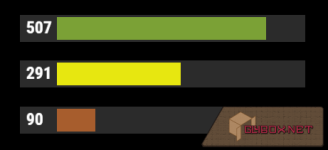
When wearing a diving tank, an oxygen level bar is being displayed in different colours, depending on the level and the actual amount is shown next to it.
When diving, by default, a short alert is given at 100 and a more continuous beeping occurs from 15 on. A second alert is available. Set alerts to 0 if no beep is wanted. A maximum number of alerts a player can have can be omitted by setting the configuraiton value to 0.
One can choose to display the bar, the value or both. A bitmap of which the URL can be changed in the config can be displayed to the left of those. Colors can be adjusted. The last two characters of the color codes are used for the transparancy. If omitted, the default will be used. Information can be repositioned. By default, when having permission, the bar and the value is being displayed.
Players can change the information shown, color levels and alerts when they have the modify permission.
Specific player data can be removed automatically by setting the config option "Remove after offline days". Data of players who haven't been online within the period will be removed. The data is checked once a day.

When using hexadecimal values, a custom transparancy can be defined by the last 2 characters.
When using color names, following are available. The names are case-sensitive.
When diving, by default, a short alert is given at 100 and a more continuous beeping occurs from 15 on. A second alert is available. Set alerts to 0 if no beep is wanted. A maximum number of alerts a player can have can be omitted by setting the configuraiton value to 0.
One can choose to display the bar, the value or both. A bitmap of which the URL can be changed in the config can be displayed to the left of those. Colors can be adjusted. The last two characters of the color codes are used for the transparancy. If omitted, the default will be used. Information can be repositioned. By default, when having permission, the bar and the value is being displayed.
Players can change the information shown, color levels and alerts when they have the modify permission.
Specific player data can be removed automatically by setting the config option "Remove after offline days". Data of players who haven't been online within the period will be removed. The data is checked once a day.
Permissions
This plugin uses the permission system. To assign a permission, use oxide.grant <user or group> <name or steam id> <permission>. To remove a permission, use oxide.revoke <user or group> <name or steam id> <permission>.- chilldiving.use - Gives players the ability to use commands and allows the info to be shown.
- chilldiving.modify - Lets players change what information is shown, modify color levels and alerts.
Configuration
The settings and options can be configured in the ChillDiving file under the config directory. The use of an editor and validator is recommended to avoid formatting issues and syntax errors.Chat Commands
The player can enable or disable the functionality:- /diving on
- /diving off
- diving view bar
- diving view value
- diving view all
- diving add alert <number>
Example: diving add alert 80
- diving add alert <number>*
Example: diving add alert 20*
- diving remove alert <number>
Example: diving remove alert 20
No * is needed to remove a continuous alert.
- diving add range <number> <barcolor> <fontcolor>
- diving remove range <number>
- diving add range 500 #34EB3A #FFFFFF
- diving add range 500 #34EB3AFF #FFFFFF
- diving add range 100 Tomato White
- diving show alerts
- diving show ranges
- diving reset
- diving colors list
- diving colors help
Previews
Colors
Colors can be defined by using the hexadecimal value or a color name.When using hexadecimal values, a custom transparancy can be defined by the last 2 characters.
When using color names, following are available. The names are case-sensitive.